

Pit assistant
What it shows
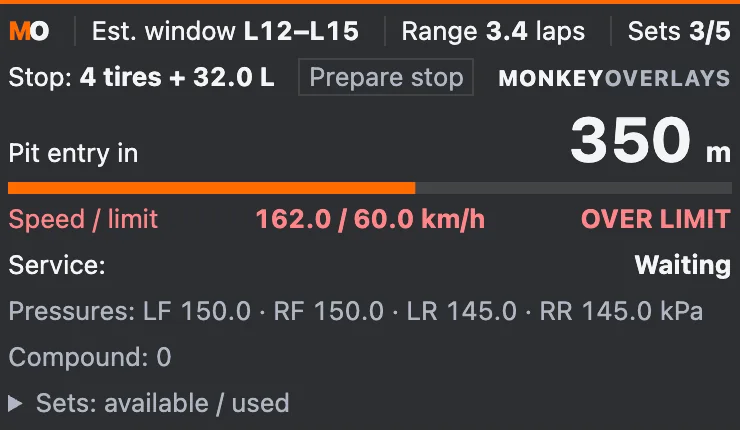
Section titled “What it shows”On pit approach or in pit lane, shows speed against the YAML limit, distance to your stall, limiter, nearby traffic ahead/behind and existing service information. Green below the margin, yellow near the limit, red above it.
URL options
Section titled “URL options”approachOnly=1 hides the assistant outside pit approach/road. approachDistanceM=800 sets proximity to the learned entry (50–1000 m); the simulator’s explicit approach signal also activates it. Learned proximity may activate each lap and does not establish pit intent. approachOnly=0 keeps the compact view and Prepare stop.
nearLimitKph=3 sets the yellow margin (0–20 km/h), with no tolerance above the limit. showTraffic=0 hides cars; trafficDistanceM=100 sets their range (10–200 m). Up to two cars ahead and two behind, excluding parked pit-stall cars.
Calculations and limits
Section titled “Calculations and limits”Stall distance uses DriverPitTrkPct; distances are longitudinal estimates, not actual pit-lane geometry. Missing readings show —. Entry learning needs observed transitions; without them it waits for explicit approach or pit road. Read-only: never changes service requests. Subscribes at 4 Hz while hidden/compact and 20 Hz on approach/in pits.
http://127.0.0.1:8745/w/pits?lang=enMaximum subscription: 4 / 20 Hz.
Privacy
Section titled “Privacy”Uses car numbers only, with no names or account IDs. Data is processed on the PC. OBS shares visible content when you stream or record that source.