

Telemetry vs best lap
What it shows
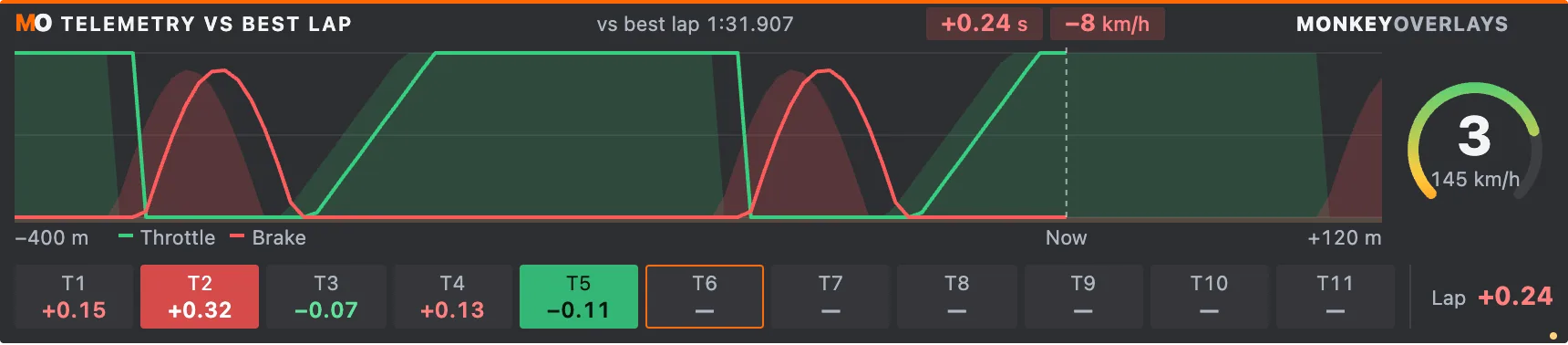
Section titled “What it shows”The best valid session lap as throttle and brake filled areas, with current pedals drawn as lines. A cursor separates driven distance from the next 120 m. Includes gear, RPM arc, speed and corner chips: orange for the current corner, solid red for the biggest loss and solid green for the biggest gain.
http://127.0.0.1:8745/w/telemetry-compare?lang=enMaximum subscription: 20 Hz; canvas capped at 30 Hz.
URL options
Section titled “URL options”behind=100..400 (400 m), gauge=0 hides the gauge, corners=0 hides chips and lap total, speed=0 hides speed and its difference. Only reference=best is supported: Corner Report’s optimal reference has no continuous trace.
The reference is the faster of today’s best lap and your all-time best saved on your PC for that car and track; the label says which (“today” or “saved” with the date). So you compare from the first lap on another day.
Calculations and limits
Section titled “Calculations and limits”Current time minus reference: positive loses time, negative gains. Speed difference uses the opposite colors. Corners are detected braking/lift zones, can overlap and do not necessarily match official numbering. The lap total includes straights, so it is not a sum of chips. Until a valid lap is completed, current pedals remain visible with a waiting message. Changing session, car or track clears the reference.
Privacy
Section titled “Privacy”Player telemetry only, without identity or external services. Example samples are invented. If the widget is shown in OBS, its visible values become part of the broadcast.