

Track map
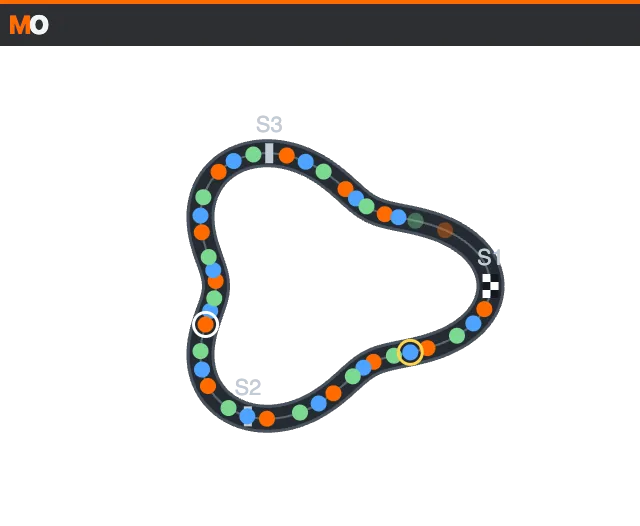
What it shows
Section titled “What it shows”Complete a clean lap to draw the track using your own car’s speed and heading. Cars follow their lap progress, colored by class. A white ring marks your car, a yellow ring marks the focused car, and pit cars are dimmed. A checkered marker shows the finish; sector starts carry S1, S2… labels.
Open and configure
Section titled “Open and configure”http://127.0.0.1:8745/w/track-map?lang=enAdd it from the desktop or stream canvas catalog. Choose north up or heading up, dot size and car numbers. The initial canvas size is 320 × 240 px. Use common settings for scale, opacity and visibility. Reduced motion keeps the orientation fixed.
Learn and delete
Section titled “Learn and delete”Before a valid lap is complete, a message and optional linear fallback appear. Pits, incidents, telemetry gaps and replays cannot produce a new map. Each track configuration keeps the lap with the least closure drift. In widget settings, delete the current track map and confirm: the next complete clean lap rebuilds it. Demos do not modify your saved maps.
Limits and privacy
Section titled “Limits and privacy”The shape approximates your driven line; sliding and elevation can distort it. It cannot learn without heading. It disappears on disconnection and can hide without car positions. It uses no iRacing maps or Lovely Sim Racing data. Only geometry and a local track key are stored, without driver identity. Read the privacy policy.